
Android is an interesting platform for embedded devices of many types, not just phones. There are ports for various development boards, including the Beagleboard. To get an idea of how easy it is to implement on a new platform, I ported it to the Digi Wi-i.MX51 Jumpstart board which I reviewed earlier (see http://www.embedded-linux.co.uk/hardware/ccwi.imx51). I will post full details to Inner Penguin later. In this article I just want to show the end result.
Features that work in the current version of the port include
Not working/not tested
For simplicity, I am booting off an SD card and I am putting all the Android files and data into a single partition rather than three separate ones as you would on a production system. You will need an SD card of at least 256 MiB capacity (I used a 4 GiB card). I used Ubuntu 10.04 to format the card but it should work on any Linux distribution.
Partition the SD card
You need to create two partitions:
Partition 1: at least 4 MiB with system id 6 (FAT16), for the kernel
Partition 2: at least 200 MiB with system id 0x83 (Linux), for the root file system
Create a file system of type msdos on the first partition.
Create a file system of type ext3 on the second partition.
Copy the kernel
Download the kernel image from http://www.embedded-linux.co.uk/downloads/uImage-2.6.31-ccwmx51js-android. Copy it to first partition as file "uimage".
Copy the root file system
Download the Android file system image from http://www.embedded-linux.co.uk/downloads/android-fs-2.1-ccwimx51.tar.gz. Un-tar it to the second partition.
Un-mount both partitions.
Remove the SD card and plug it into the ccwimx51 board.
Configure u-boot
Connect a serial cable to the console port on the board and start a terminal emulator (I use minicom) with a baudrate of 38400 and no hardware or software flow control.
Turn on the board and hit Ctrl-C to get to a U-Boot prompt (CCWMX51 #). Type the following, making sure that the two setenv commands are all on one line:
setenv bootargs console=ttymxc1,38400 video=displayfb:LCD wvga calibration root=0xb302 rw rootdelay=4 init=/init androidboot.console=ttymxc1
setenv bootcmd mmc rescan 1\;fatload mmc 1:1 a0000000 uimage\;bootm a0000000
saveenv
Turn off the board.
Using Android
With the SD card in the SD slot on the board turn it on. On the LCD display you should see the normal penguin logo, then the word “Android” followed by an animated Android logo and finally the Android screen.
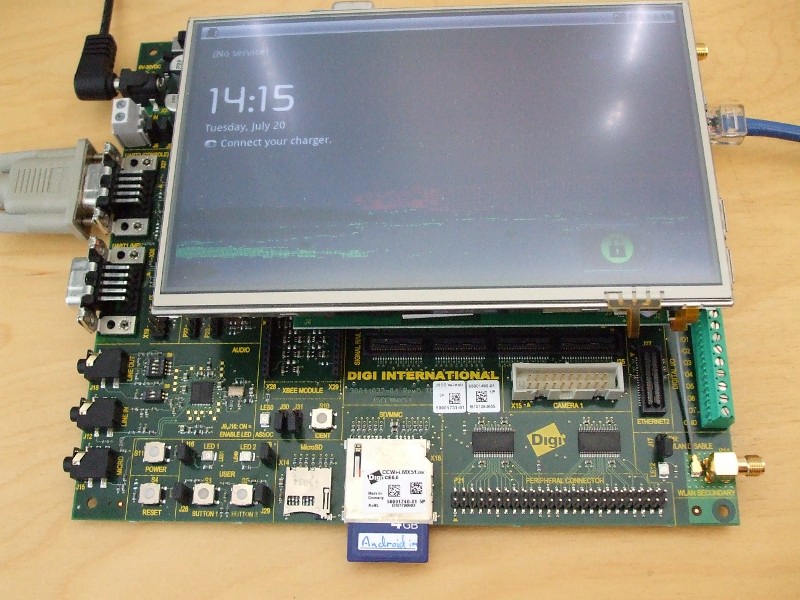
The screen is locked initially. Normally you would press the Menu button to unlock it, so I have mapped the button user marked BUTTON1 as “Menu” and also BUTTON2 as “Home”. Pressing BUTTON1 should bring you to this screen.
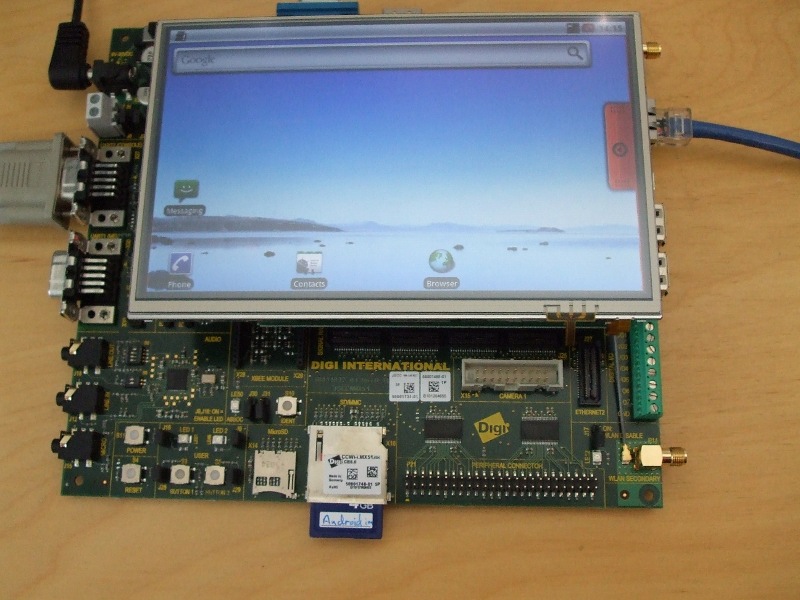
Press BUTTON2 (Home) to get back here at any time. With a combination of these two buttons and the touch screen you can navigate around most of the Android apps. Or, you can plug in a USB keyboard in which case you will find
HOME - Home
F1 - Menu
F4 - suspend/resume
Cursor keys - as you would expect
You can access the network via Ethernet: it will attempt to contact a local DHCP server as it boots up and configure the network from that.
You can get a root shell either via the serial terminal, or if you have a copy of adb (Android Debug Bridge) by typing
adb connect [IP address of the board]:5555
adb shell
Enjoy!
Comments
Source Code
hi, i booted my Digi ConnectCore Wi-i.MX51 with your ubuntu and android images that you uploaded and they work great.
do you have the source code of android and also the toolchain? or where can i get them? i want to build my own and do some changes. or do you know a forum or something like that related the Digi ConnectCore Wi-i.MX51 where to collaborate?
Regards
SD Worked :)
Hi,
I have booted Android using the standard SD card. I partioned my card into three FAT16-EXT3-FAT16. The idea was that I hoped that Android would detect my third partition for user files (audio, pictures ....) - but it did not.
I would be interested to learn how to find a distribution, such as Android and compile it into an image file and how to customise the Kernal for the digi board .... are there any tutorials? Is it possible to remove the phone related pharses from Android?
Regards,
Tom
VFS: Cannot open root device "mmcblk0p2" or unknown-block(179,2)
Hi,
The port to Android is certainly exciting and I look forward to your detailed tutorial. However, I have been doing some of my own experiments, similar to bodzio which are resulting in similar problems.
I have pasted my findings and would appreciate any assistance, I have a this in a document with full scripting but could not find a means of uploading such a file.
Regards,
Tom
Using an 8Gb Sandisk MicroSD card
Using fdisk to check my partitions are the correct file system
Device Boot Start End Blocks Id System
/dev/sdb1 1 3 24066 6 FAT16
/dev/sdb2 4 67 514080 83 Linux
Checking contents of partition 1
root@SuperComputer:/media/Part1# ls -a
. .. uimage
un-tar'ing the android root contents to partition 2
tar -C /media/Part2 -zxvf /home/tom/Downloads/android-fs-2.1-ccwimx51.tar.gz
checking contents of partition 2
root@SuperComputer:/media/Part2# ls -a
. .. cache data default.prop dev etc extsd init init.goldfish.rc init.rc lost+found proc sbin sdcard sqlite_stmt_journals sys system ts.log udisk
This is an extract from the terminal window in DIGI ESP, when the following environment variables are set:
bootcmd=mmc rescan 0;fatload mmc 0:1 a0000000 uimage;bootm a0000000
setenv bootargs console=ttymxc1,38400 video=displayfb:LCD wvga calibration root=/dev/mmcblk0p2 rw rootdelay=4 init=/init androidboot.console=ttymxc1
Starting kernel ...
Uncompressing Linux........................................................................................................................................ done, booting the kernel.
Linux version 2.6.31 (chris@chris-laptop) (gcc version 4.4.3 (GCC) ) #1 PREEMPT Wed Jul 21 12:03:11 BST 2010
CPU: ARMv7 Processor [412fc085] revision 5 (ARMv7), cr=10c53c7f
CPU: VIPT nonaliasing data cache, VIPT nonaliasing instruction cache
Machine: Digi ConnectCore Wi-MX51 on a JSK Board
Memory policy: ECC disabled, Data cache writeback
Built 1 zonelists in Zone order, mobility grouping on. Total pages: 113792
Kernel command line: console=ttymxc1,38400 video=displayfb:LCD wvga calibration root=/dev/mmcblk0p2 rw rootdelay=4 init=/init androidboot.console=ttymxc1
Unknown boot option `androidboot.console=ttymxc1': ignoring
it continues and ends in ...
input: 2.4GHz 2way RF Desktop Receiver as /devices/platform/fsl-ehci.0/usb1/1-1/1-1.1/1-1.1:1.0/input/input2
generic-usb 0003:1BCF:05C5.0001: input: USB HID v1.00 Keyboard [2.4GHz 2way RF Desktop Receiver] on usb-fsl-ehci.0-1.1/input0
input: 2.4GHz 2way RF Desktop Receiver as /devices/platform/fsl-ehci.0/usb1/1-1/1-1.1/1-1.1:1.1/input/input3
generic-usb 0003:1BCF:05C5.0002: input: USB HID v1.00 Mouse [2.4GHz 2way RF Desktop Receiver] on usb-fsl-ehci.0-1.1/input1
VFS: Cannot open root device "mmcblk0p2" or unknown-block(179,2)
Please append a correct "root=" boot option; here are the available partitions:
1f00 768 mtdblock0 (driver?)
1f01 512 mtdblock1 (driver?)
1f02 40960 mtdblock2 (driver?)
1f03 482048 mtdblock3 (driver?)
b300 7977472 mmcblk0 driver: mmcblk
b301 24066 mmcblk0p1
b302 514080 mmcblk0p2
Kernel panic - not syncing: VFS: Unable to mount root fs on unknown-block(179,2)
Then I tried modifying the bootargs command to:
bootargs=console=ttymxc1,38400 video=displayfb:LCD wvga calibration root=/dev/mmcblk0p2 rootwait
input: mxc_ts as /devices/virtual/input/input1
mxc input touchscreen loaded
pmic_rtc pmic_rtc.1: setting system clock to 1970-03-15 11:15:26 UTC (6347726)
Waiting for root device /dev/mmcblk0p2...
mmc0: new high speed SDHC card at address d555
mmcblk0: mmc0:d555 SU08G 7.60 GiB (ro)
mmcblk0: p1 p2
VFS: Cannot open root device "mmcblk0p2" or unknown-block(179,2)
Please append a correct "root=" boot option; here are the available partitions:
1f00 768 mtdblock0 (driver?)
1f01 512 mtdblock1 (driver?)
1f02 40960 mtdblock2 (driver?)
1f03 482048 mtdblock3 (driver?)
b300 7977472 mmcblk0 driver: mmcblk
b301 24066 mmcblk0p1
b302 514080 mmcblk0p2
Kernel panic - not syncing: VFS: Unable to mount root fs on unknown-block(179,2)
This time it looks to recognise the card as it decodes some of its details.
I then tried subtituting in the hexadecimal address:
setenv bootargs console=ttymxc1,38400 video=displayfb:LCD wvga calibration root=0xb302 rootwait
input: mxc_ts as /devices/virtual/input/input1
mxc input touchscreen loaded
pmic_rtc pmic_rtc.1: setting system clock to 1970-03-15 11:30:14 UTC (6348614)
mmc0: new high speed SDHC card at address d555
VFS: Cannot open root device "0xb302" or unknown-block(179,2)
Please append a correct "root=" boot option; here are the available partitions:
1f00 768 mtdblock0 (driver?)
1f01 512 mtdblock1 (driver?)
1f02 40960 mtdblock2 (driver?)
1f03 482048 mtdblock3 (driver?)
Kernel panic - not syncing: VFS: Unable to mount root fs on unknown-block(179,2)
then with the hexadecimal root=root
setenv bootargs console=ttymxc1,38400 video=displayfb:LCD wvga calibration root=root=0xb302 rw rootdelay=4 init=/init androidboot.console=ttymxc1
input: mxc_ts as /devices/virtual/input/input1
mxc input touchscreen loaded
pmic_rtc pmic_rtc.1: setting system clock to 1970-03-15 11:38:31 UTC (6349111)
Waiting 4sec before mounting root device...
usb 1-1.1: new low speed USB device using fsl-ehci and address 3
usb 1-1.1: New USB device found, idVendor=1bcf, idProduct=05c5
usb 1-1.1: New USB device strings: Mfr=0, Product=2, SerialNumber=0
usb 1-1.1: Product: 2.4GHz 2way RF Desktop Receiver
usb 1-1.1: configuration #1 chosen from 1 choice
input: 2.4GHz 2way RF Desktop Receiver as /devices/platform/fsl-ehci.0/usb1/1-1/1-1.1/1-1.1:1.0/input/input2
generic-usb 0003:1BCF:05C5.0001: input: USB HID v1.00 Keyboard [2.4GHz 2way RF Desktop Receiver] on usb-fsl-ehci.0-1.1/input0
input: 2.4GHz 2way RF Desktop Receiver as /devices/platform/fsl-ehci.0/usb1/1-1/1-1.1/1-1.1:1.1/input/input3
generic-usb 0003:1BCF:05C5.0002: input: USB HID v1.00 Mouse [2.4GHz 2way RF Desktop Receiver] on usb-fsl-ehci.0-1.1/input1
Root-NFS: No NFS server available, giving up.
VFS: Unable to mount root fs via NFS, trying floppy.
VFS: Cannot open root device "root=0xb302" or unknown-block(2,0)
Please append a correct "root=" boot option; here are the available partitions:
1f00 768 mtdblock0 (driver?)
1f01 512 mtdblock1 (driver?)
1f02 40960 mtdblock2 (driver?)
1f03 482048 mtdblock3 (driver?)
b300 7977472 mmcblk0 driver: mmcblk
b301 24066 mmcblk0p1
b302 514080 mmcblk0p2
Kernel panic - not syncing: VFS: Unable to mount root fs on unknown-block(2,0)
The micro SD driver seems to have a problem
Please use full-size SD cards for the time being.
Chris.
I have the same error with
I have the same error with MicroSD. On standard SD Android works OK. But my microSD have badblocks :)
Or something with root file system is wrong: partition, slowmmc, bootargs...
Hi, its cool Android works
Hi, its cool Android works with this board :)
I try booting from MicroSD, and I modify:
setenv bootcmd mmc rescan 0\;fatload mmc 0:1 a0000000 uimage\;bootm a0000000
Kernel booting OK, but later can't find root file system, i have error with wrong blocks or something.
I'ts possible booting this image from MicroSD or only from SD/MMC?
You need change the kernel boot args
You need to change the kernel boot args so it mounts the rootfs from mmcblk1 partition 2. In u-boot, enter
setenv bootargs console=ttymxc1,38400 video=displayfb:LCD wvga calibration root=/dev/mmcblk1p2 rw rootdelay=4
or, I think that
setenv bootargs console=ttymxc1,38400 video=displayfb:LCD wvga calibration root=root=0xb30a rw rootdelay=4
would work as well.
Bye,
Chris
Please ignore my last message
I was wrong: if a micro SD card is detected at boot it will become /dev/mmcblk0 (NOT mmcblk1) so the kernel command line should remain the same. It seems that there is a problem with the micro SD driver: you will have to use full-size SD cards for this demo.
Chris.
Post new comment